myDataflor

The central cloud platform for your construction projects


Our preview of myDataflor Connect your office, construction site, and field service in a shared digital work environment. Projects, specifications, measurements, drawings, and key business figures are centrally available – regardless of where you are working.


For myDataflor by registering.

Arrange a free consulting call

Cloud symbol for the central platform myDataflor

Everything important in one place

myDataflor combines solutions such as BUSINESS, CAD and LANDSKETCHIntegrated cloud services link projects, data, and applications. Information doesn't need to be entered multiple times or transferred between different systems. This way, everyone involved works with up-to-date data – in the office, on the construction site, and on the go.

Features and Highlights

Address management in BUSINESS web about the myDataflor Cloud platform
BUSINESS website

Organize projects and tasks centrally

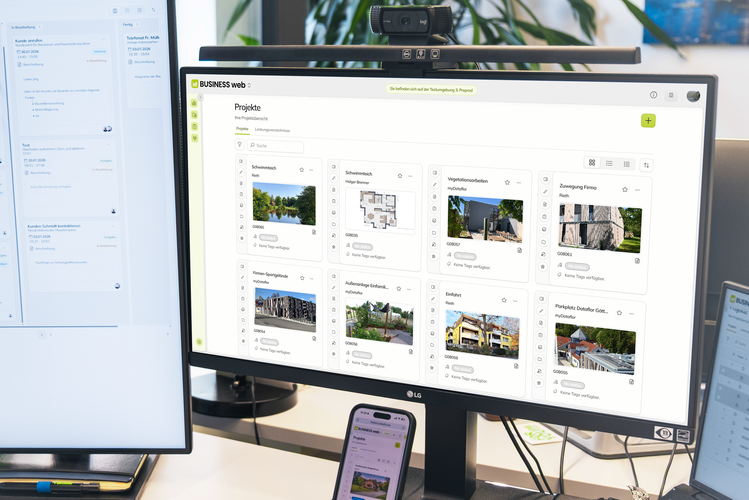
Our preview of BUSINESS With the web interface, you can access important information from your daily work directly through your browser. Projects, service specifications, addresses, tasks, comments, and attachments can be accessed and edited centrally. A clear dashboard displays relevant project and company data at a glance. This allows you to keep track of tasks, developments, and key performance indicators at all times.

Your benefits

  • Centrally manage projects and specifications
  • Collaborative editing of tasks, comments, and attachments
  • Access addresses and project information on the go
  • Present current key figures clearly
  • Simplify collaboration between office and construction site
Key performance indicators and dashboards with BUSINESS BI in myDataflor
BUSINESS BI

Easily understand key business figures

BUSINESS BI makes your company data directly in myDataflor Visible. Pre-built reports provide sound insights into projects, orders, sales and costs without complex setup.

Clear dashboards help you to identify trends early and make decisions based on current figures.

At a glance:

  • Analyze projects and order backlog
  • Evaluate sales and costs
  • Identifying developments and deviations
  • Visualize key performance indicators clearly
  • Supporting decisions with up-to-date data
CAD-Planning with LANDXPERT web within myDataflor
LANDXPERT website

CAD-Edit drawings directly in the browser

Our preview of LANDXPERT Create and edit drawings directly in your browser. A local CADNo installation is required for use.

Plans can be opened, edited, and linked to further project information. Through integration into myDataflor Drawings and project data are available wherever they are needed.

Your benefits

  • Linking specifications and creating quantity surveys for quantity verification
  • project and CAD- Centrally consolidate data
  • Easier coordination of plans within the team
  • Accessing data from different workstations
  • Reuse information without media breaks
Measurement data and geodata in MEASURE web within myDataflor
MEASURE web

Centrally process measurements and geodata

With MEASURE web, measurement data, point clouds, and geodata become part of a seamless digital workflow. Bills of quantities from myDataflor They can be linked to measurements and assigned to the appropriate projects.

Surveys can be processed on the go in the field or in the office. Maps and geodata such as cadastral maps or Google Maps support orientation and planning.

From the construction site to the office:

  • Linking specifications with measurements
  • Assign measurement data directly to projects
  • Using point clouds and geodata
  • Integrate maps and cadastral information
  • Provide results centrally for planning and billing

A glimpse into our MEASURE web

myDataflor combines the individual work steps into a common process
Create Project
  • Project data, addresses and specifications are available centrally.


Calculating services
  • Our preview of BUSINESS Edit and calculate bills of quantities directly in your browser.
Create and edit plans
  • LANDXPERT web connects CAD-Drawings with the associated project data.
Recording and assigning measurements
  • MEASURE solutions enable mobile data acquisition and processing in myDataflor further processed.
Evaluate key figures
  • BUSINESS BI makes projects, revenues and costs clearly visible.
Work where your projects originate.

Access projects, specifications, drawings, measurements, and key performance indicators flexibly. With myDataflor Connect your applications, data, and workspaces in a central cloud platform.

For myDataflor by registering.

Arrange a free consulting call

Digital processing of construction projects with Dataflor software

Frequently asked questions

What is the Dataflor Cloud?

myDataflor It connects your projects, data, and applications in a central digital work environment. This allows information to be shared in the office, on the construction site, and on the go.

What is myDataflor?

myDataflor This is Dataflor's central cloud platform. Various browser-based applications and services are available there – including BUSINESS web, BUSINESS BI, LANDXPERT web and MEASURE web.

Which applications can I use via myDataflor use?

In myDataflor You will find, among other things, BUSINESS web with the LV calculator, BUSINESS Business intelligence for business analyses as well as LANDXPERT web and MEASURE web for planning, surveying and quantity determination. The range of functions is continuously being expanded.

Do I need to install software to use it?

The applications in myDataflor They are accessed directly through the browser. Local installation is therefore usually not required. You only need internet access and a supported browser.

Can I access my data while on the go?

Yes. You can. myDataflor Access shared projects and information from different work locations using a computer, tablet or smartphone.

How do cloud computing and existing Dataflor programs work together?

The cloud solutions complement the existing Dataflor applications. Data from BUSINESS, CAD, LANDSKETCH and the mobile apps can be connected to each other and used in seamless workflows.

Can multiple people work on one project?

Yes. Authorized employees can access shared project information. This ensures that up-to-date data is available both in the office and on the construction site, eliminating the need for multiple transfers or entries.

Is my data protected in the cloud?

Dataflor employs technical and organizational measures to protect your data. Access is controlled via personal user accounts and defined permissions.

Can I use individual cloud applications?

The applications and features available to you depend on the products and licenses you have purchased. We would be happy to advise you on selecting a suitable solution.

How do I get started? myDataflor?

After setup, you will gain access to your personal myDataflor AreaThere, users, applications, and projects can be set up according to the solutions you have booked.

Subscribe to the Dataflor newsletter

Stay up to date: with current topics, new products, events and tips for your digital workday.